
converting to a linux man



 21 Feb 2007, 5:08 pm

i am considering converting to a linux man. i have always used windows, and thought people who called it unstable where morons. i had my system setup stable as hell. my brother always had probs and i would have to spend hours fixing some jackass crap on his comp. i had no idea why or how every1 i knew had probs keeping their comp stable, and mine is just stable w/ my every day use. i had customized, edited, f.cked with every part of it.
i currently run Windows XP Media Center Edition and i love it... but now it is unstable. I broke the restore disc it came with. so i had to install windows the old way when i formated, and my key did not work on it. i had to get a key off the net. then i couldn't register it. i had to mess with that for a while before i could trick the comp into thinking it was registered because i didn't want to use some jackass exe crack. then after a while those genuine windows checks started failing. the funny thing is i own a copy of MCE and cannot use it.
so anyways im tired of this crap. i was looking into linux. a friend of mine recommended fedora core 6 and i am downloading a dvd iso of it now. i have skimmed over some text about it, and apparently i am going to have annoying problems. i am going to have to use a third party video driver, i have no idea if it will support my tv tuner, i am going to need to install third party mpeg/mp3 playback, third party ntfs read/write support, etc.
so basically, what is a good distro of linux that supports media very well, easy to use, and maybe even support a media center. also i don't want to compromise other things like a good programming development kit. i need the best distro i can get to launch myself into this linux world.
 21 Feb 2007, 6:07 pm
Those problems you talk about for Linux are common to all distributions. I personally recommend Ubuntu linux at http://www.ubuntu.com (or Kubuntu, depending on your visual tastes). There's a little program called automatix at http://www.getautomatix.com that will install proprietary nvidia or ati video drivers for you as well as audio/video codecs so you can play whatever you want.
NTFS file system support sucks no matter what you use. Move to FAT or EXT3.
I did a post in my blog recently on why I use linux... check it out at http://www.jamesonrobert.com
_________________
Air·is·water·with·holes·in·it. Think·honk·if·you're·a·telepath. Never·call·a·man·a·fool.·Borrow·from·him. A·tautology·is·a·thing·which·is·tautological. Hi!·I'm·a·.signature·virus!·Copy·me·into·your·~/.signature·to·help·me·spread!
TheMachine1
Veteran

Joined: 11 Jun 2006
Gender: Male
Posts: 8,011
Location: 9099 will be my last post...what the hell 9011 will be.
 21 Feb 2007, 7:29 pm
As Jemeson mentioned, NTFS is a pain. I have two installs of XP on my machine heres. They are the two NTFS partitions. My various installs of Linux are in EXT2/3 partitions, dotted about the place. I have a bunch of FAT partitions that I use, in effect, to transfer data between XP and Linux. E.g. All my SeaMonkey email lives in a folder/dir on a FAT partition that I use from both XP and flavoured Linuxes.
In fact, just at the moment, my system is in a pretty stupid state. Three HDDs, 23 partitions.
Depending on my whim, I'll do my coding from a shell, KDevelop or Monodevelop (son of Sharpdevelop on Windows). There are a bunch of other IDEs - you pay your money, you take your choice.
Erm. Did I say "you pay your money...". Delete that. Replace with just "You take you choice".
Ubuntu is excellent. I just ran up Synaptic (a software package management GUI), which tells me I have 2,209 packages installed out of the available 20,317. At random, under "Development", "bicyclerepair" caught my eye:
A framework and refactoring tool for Python. IDE Plugins are included for
Pymacs, IDLE and Vim. Using Bicycle Repair Man you can rename classes, methods
and variables, and all users of them are found and adjusted appropriately.
I don't think it's joke.
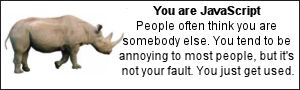
... long distracted period of searching for that obscure programming language, that was made up to be the hardest to write code in, ever. The output character set was differently represented than the input ...
... distraction led to: http://www.bbspot.com/News/2006/08/language_quiz.php, where I got:
_________________
"Striking up conversations with strangers is an autistic person's version of extreme sports." Kamran Nazeer

 22 Feb 2007, 12:18 am
i am stuck on a few things on ubuntu.
when i try to do anything w/ managing the packages from my non-root desktop it says to run "dpkg --configure -a" but then it tells me i do not have privilege to when i try.
i installed the nvidia driver off that automatrix thing, but it seems to leave a LOT out of the config. i can't even get it to use my TV out. i tried downloading the real driver off the nividia site, and to run it i need to exit X. i press ctrl+alt+back but then X starts again in like 2 sec. i tried doing it real fast, holding it down, etc, i cannot get it to not restart X. i tried booting safemode but it tells me i need to be some level 3 mode or something, but when i type the command it tells me, X starts. so basicly how can i exit X and install a video driver?
I don't know if this is related to the video driver, but when i view video it looks funny. it seems to lack quality. I also dont think it is using overlay because when i move the window around, the video doesn't seem to drag behind.
When i hold down the middle scroll button thing and move the mouse, it does not scroll. this is no big deal but it is annoying. also when i double-click the left part of a windows title icon thing it does not close it.
if i cannot get these things worked out, i may end up going back to windows 
22 Feb 2007, 8:26 am
Don't worry, this is all stuff that can be fixed.
First of all, the command "sudo" is your friend. Put that in front of any command to run it as root. It'll ask for your password.
If you don't like the automatix nvidia driver, try envy... it will install the absolute latest nvidia driver for you. The newer nvidia drivers come with a config program. http://albertomilone.com/nvidia_scripts1.html
For the middle button problem, I suggest searching the ubuntu forums. Lots of help there. I don't remember how I fixed that problem myself, but I know I found the answer there. http://www.ubuntuforums.org
If you want to switch to a command prompt outside of xwindows, you can do one of two things. CTRL-ALT-F1 will switch to a terminal. From there you can log in, and switch to a different runlevel using the sudo command. Or, you can just do the sudo runlevel switch thingie in a windowed terminal.
Don't give up hope yet. Just try it for a couple more days. Learn a little about it before you go back. The ubuntu forums are a big help for any problems.
_________________
Air·is·water·with·holes·in·it. Think·honk·if·you're·a·telepath. Never·call·a·man·a·fool.·Borrow·from·him. A·tautology·is·a·thing·which·is·tautological. Hi!·I'm·a·.signature·virus!·Copy·me·into·your·~/.signature·to·help·me·spread!
22 Feb 2007, 3:54 pm
The Nvidia driver game can be a bit of a nightmare. One odd thing about Ubuntu is that I haven't yet figured out where the default run level is set (it makes it 2, for some reason), plus they seem to have made all run levels start X. I manually edited /etc/init.d so that run level 3 doesn't start X. Then, I drop into a shell (Ctrl/Alt/F1) and do "init 3", followed by "./nvidia-install" or whatever.
However, if all that sounds silly, I've stopped messing with the latest/greatest Nvidia drivers, as the Ubuntu packaged stuff is fine. I'm using 1.0-7184 from nvidia-glx-legacy. I've a sad old 1.6P4 + GeForce2 running Beryl at... lets see... 20 fps... and hey! It won't rotate my cube while showing the fps box! Not fair!.
--------------
I'm not sure what you expect to happen when you "move the mouse with the middle button held down". I expect whatever I have configured, in whatever app I'm using, to happen. Here in Seamonkey, nothing. On the desktop background, I spin my cube (as I just discovered - I had been using Ctrl/Shift/Left button drag for that - I didn't know middle drag also worked). Actually, I'm rather glad I don't have anything else expecting middle/drag, because Linux generally uses middle click for paste (highlight with left button = copy, middle click = paste - no key presses at all). Middle click/hold/drag would easily get confusing, and in OpenOffice impossible, as that doesn't wait to see if you're holding the button - it pastes immediately.
----------------
It sounds a bit odd that you are getting told to run "dpkg --cofigure -a". As "Jameson" says, use "sudo". Just go for "sudo dpkg --cofigure -a". What's odd about it, is that I don't knopw why it's telling you to do it. I assume you are using "Synaptic", "Automatix" or "Automatix Bleeder" at this point. They all ask you for a password. You should give use USER password, not the root password. Ubuntu seems weird, to my mind, with this.
(The logic goes... you are actually using the "sudo" system again. That is configured to allow some users the privilege to do some things at some times, provided they re-enter their password to prove they are still there.)
22 Feb 2007, 4:01 pm
Sudo and sudo-like processes ask you for your password so you realize you're doing a root user action. Ubuntu does not create a root account. Gives that little bit of added protection so you can't log into your system as root.
I've never actually switched my runlevel in ubuntu. The envy nvdia driver install script will stop gdm and kdm and do the driver download and install for you without any hassle. Just run the script from that CTRL-ALT-F1 terminal. (or F2,F3,F4.. whatever) You can switch back to your X generally with CTRL-ALT-F7. Varies on some systems.
_________________
Air·is·water·with·holes·in·it. Think·honk·if·you're·a·telepath. Never·call·a·man·a·fool.·Borrow·from·him. A·tautology·is·a·thing·which·is·tautological. Hi!·I'm·a·.signature·virus!·Copy·me·into·your·~/.signature·to·help·me·spread!
22 Feb 2007, 6:34 pm
I've never actually switched my runlevel in ubuntu. The envy nvdia driver install script will stop gdm and kdm and do the driver download and install for you without any hassle. Just run the script from that CTRL-ALT-F1 terminal. (or F2,F3,F4.. whatever) You can switch back to your X generally with CTRL-ALT-F7. Varies on some systems.
I have a perfectly good root account, with password, on Edgy. I run a second X from it occasionally with "startx -- :1". It comes up on Ctrl/Alt/F9 (because Ubuntu seems to lock up F8 with the startup messages). I set the desktop background to flaming red there, so I know what I'm in! My personal account I keep with a blank password. I find this blithe "sudo" game to be pretty low security - it smacks of the Windows "everyone's an administrator" attitude. I usually do "sudo bash", so as to not have to keep answering the passwords anyway. The rule that make sense is "never become root, unless you have to do something where you absolutely can't avoid it, and then tread carefully". Under Linux, needing to be root just doesn't happen that often, other than doing package updates.
The runlevel switching I only did to get round the stupid, finicky, nvidia's own driver install game. I'll try out the "envy" script next time I break the driver. It's vaguely handy at other times, such as when the Beryl team bring out a rubbish overnighter that crashes too much!
22 Feb 2007, 8:32 pm
Or 'sudo su'.
_________________
Air·is·water·with·holes·in·it. Think·honk·if·you're·a·telepath. Never·call·a·man·a·fool.·Borrow·from·him. A·tautology·is·a·thing·which·is·tautological. Hi!·I'm·a·.signature·virus!·Copy·me·into·your·~/.signature·to·help·me·spread!

 22 Feb 2007, 9:59 pm
Welcome to the world of Linux, where you have more options and greater customization than windows will ever offer. I saw a quote somewhere and can't exactly remember where but this is how it goes; "Why just have Windows when you can use Linux and get the whole house.".
_________________
- Chadders
That's my two pence worth.


