Aaron_Mason wrote:
That's a really good idea, I'll have to do that. It would be a LOT quicker than going to the Start menu.
The start menu just ends up too much of a mess anyway, with every installer dumping it's crap in there.
It's pretty easy to do, you just right click on the toolbar, select
Toolbars/
New toolbar and then pick a folder full of shortcuts. I usually log out (windows key-L-L) and in again to save the changes, because it's a pain if I leave the computer on for ages and it ends up crashing, as I have to rearrange the menus again.
It's about time I added a drop down for downloads, seeing as my MBP has a stacks thing for it's downloads.
Having nothing on the desktop means I don't have to move anything to get to icons, and the toolbar is at the top because that's where it is on Ubuntu and OSX, and it's a lot easier to read and move a mouse down menus than up them.
I may get around to buying Vista for this thing in a few months, but at the moment I'm loving the way OSX Leopard handles windows/spaces/exposé/stacks, and has built ssh support, so I use it for most of my development work (Smultron is a great little editor).
Aaron_Mason wrote:
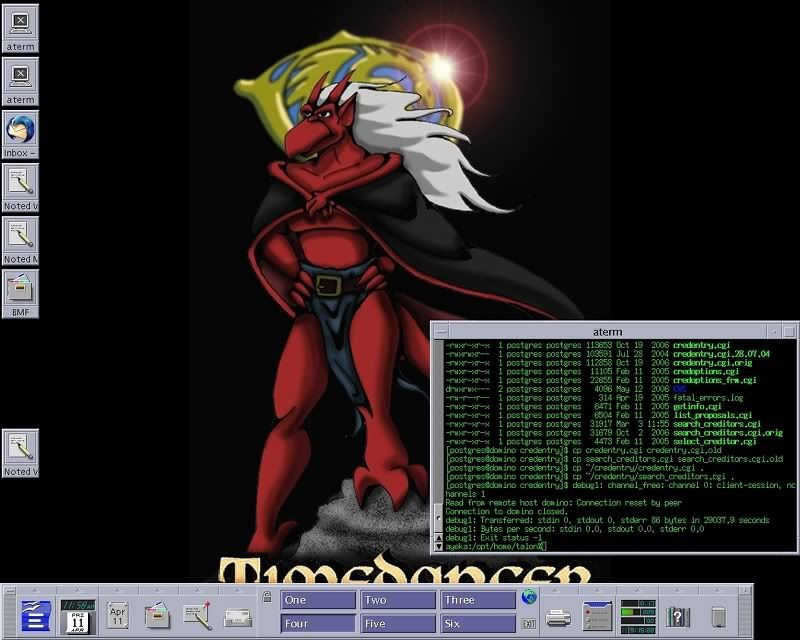
Here's mine - shrunk down so as not to make the window too wide. I have a dual monitor setup and one screen is smaller than the other.
Too late

(I did set jpg compression to max though).
I'd like a dual monitor set-up again, but I'd have to get a bigger desk first (have done tri-monitor in the past. Looks sweet running a matrix screensaver).
_________________
You aren't thinking or really existing unless you're willing to risk even your own sanity in the judgment of your existence.