fluffysaurus wrote:
SaveFerris wrote:
^ I'm not sure what your desired effect was but the URL tags in your post were not needed.
so people could read the article.
Quote:
no, that was a terrible explanation

. How/what should I have copied/pressed when on the BBC page, and which of
the little icons on the top left of this box should I have used to inserted it into my post?
Sorry

If there is a share function on the page , this will give you the link or URL of the webpage you are on. On the BBC page you clink on the SHARE icon and it will give the option of copying the link or URL.
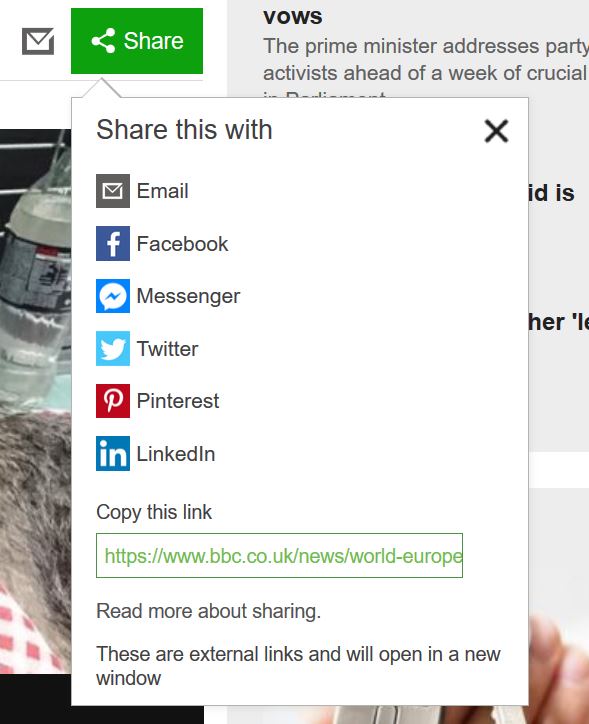
You can also just highlight the URL of the page you on to create the same link

With this link you can just copy and paste it into your post so it looks like the following
https://www.bbc.co.uk/news/world-europe-47330924If your fussy you can create a hyper link by clicking on the 'Insert URL' icon next to the 'Insert Image' icon.
When you click on the 'Insert URL' you are given two fields to fill in.
Enter a link for page: *Paste your link into this box*
Enter a description for page: *Type here what you want your link to say e.g. Click This Bacon Features*
This should give you the following result in your post a reply box ( just the green text )
Code:
[url=https://www.bbc.co.uk/news/world-europe-47330924]Click This Bacon Features[/url]
which looks like this when posted
Click This Bacon FeaturesThat's the best I can do fluffs , hope it's clearer now.
_________________
R Tape loading error, 0:1
Hypocrisy is the greatest luxury. Raise the double standard